Work IQ Dev Tools: package your team’s skills for Copilot
Build skills-only Copilot plugins with the WIQD CLI, understand registry and Agent 365 controls, and learn from our Productivity Lab and Skill Factory pilots.
On this page10 sections
We created a plugin with 12 productivity skills, uploaded it into our Microsoft 365 tenant, and confirmed the skills in Copilot Cowork.
Work IQ Dev Tools gave us a repeatable way to turn those workflows into a deployable package.
The opportunity goes beyond a developer running commands. We also used WIQD behind our Skill Factory application, where a business user can maintain skills and request a plugin ZIP through a web interface.
For teams adopting Copilot, this is worth exploring. A departmental process can become a maintained skill, several skills can become a plugin, and that plugin can have an intended audience.
This article reflects documentation and our project evidence as of 13 October 2026. WIQD is in public preview; the standalone plugin command family is alpha. The walkthrough is documentation-validated, while the project outcomes describe our recorded pilots. Release history
A plugin gives skills a delivery unit#
Work IQ Dev Tools, or WIQD, use a Microsoft 365 app package as the plugin container. It can hold skills, remote MCP connectors, and an optional declarative agent. A plugin containing only skills is supported. Plugin concepts
A skill explains how to perform a particular job. It might define the inputs needed for a campaign brief, the steps for a content review, and the expected output.
A connector provides access to tools exposed by a remote Model Context Protocol server. It might let the assistant retrieve approved content or update a campaign record.
A declarative agent defines a focused assistant with its own instructions and capabilities. You can add one when the scenario calls for that conversational experience.
The plugin packages the supported pieces for distribution. You can start with the team’s instructions and add an external connection when the workflow needs live information or actions.
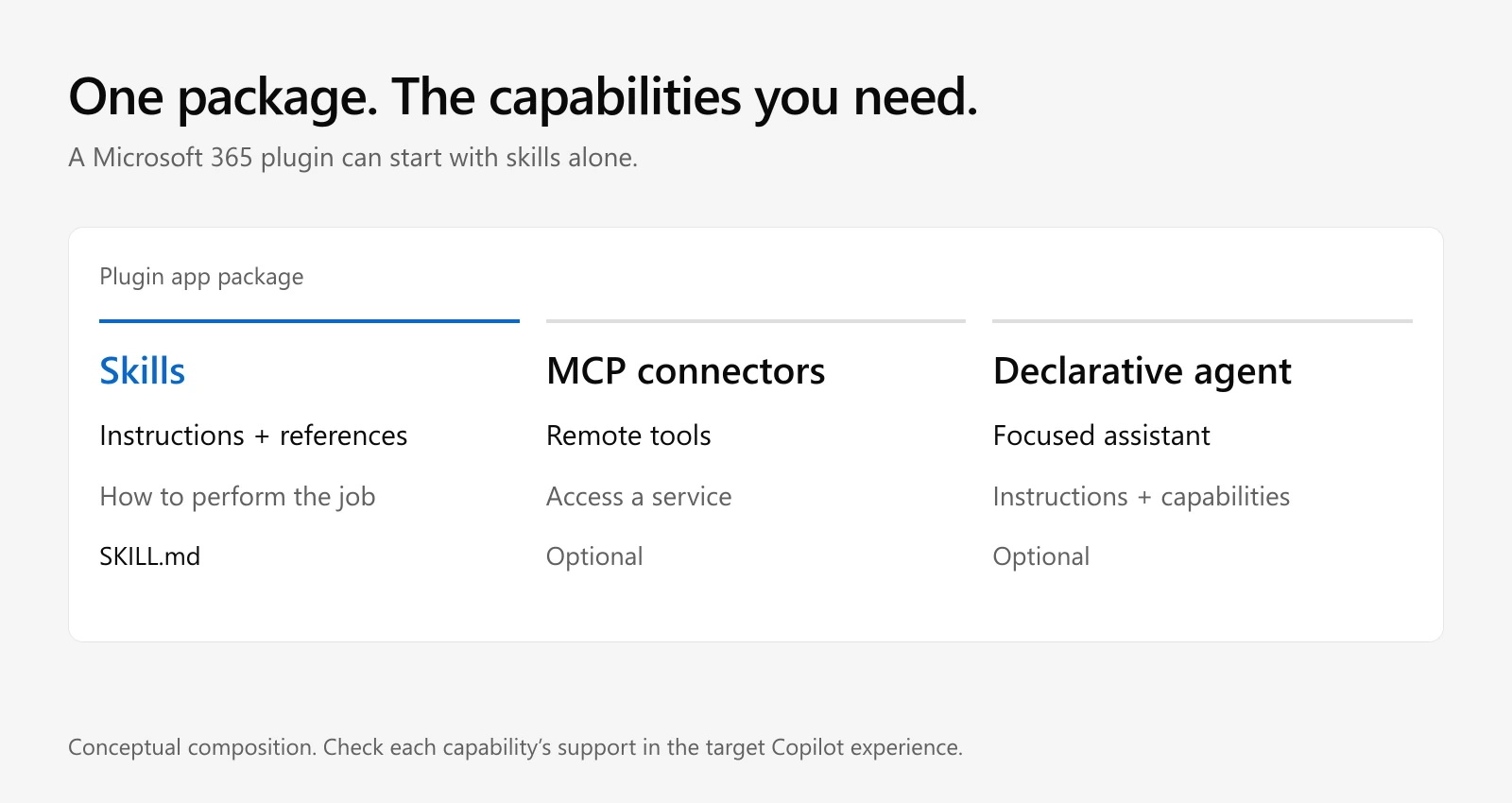
Start with the capabilities the workflow needs. Their availability still depends on the target experience.
Imagine a Marketing Workflows plugin containing campaign brief creation, brand review, and campaign retrospective preparation. A separate Sites Workflows plugin could contain content audits and launch checklists.
Those are example designs. Their value comes from the team’s real process, including the evidence it uses and the decisions that need review. I would give each skill one clear job and an owner who understands what a good result looks like.
Our first pilot contained 12 skills#
Our Productivity Lab plugin grouped workflows for meetings, briefs, research, decisions, document editing, spreadsheet checks, project updates, email drafting, and coding.
We used WIQD to create the plugin, register the skills, build its package, and provision it into the tenant. After upload, we compared the content with the local source. All 12 skill files and their 12 example files matched. We then confirmed the plugin and skills were visible in Cowork.
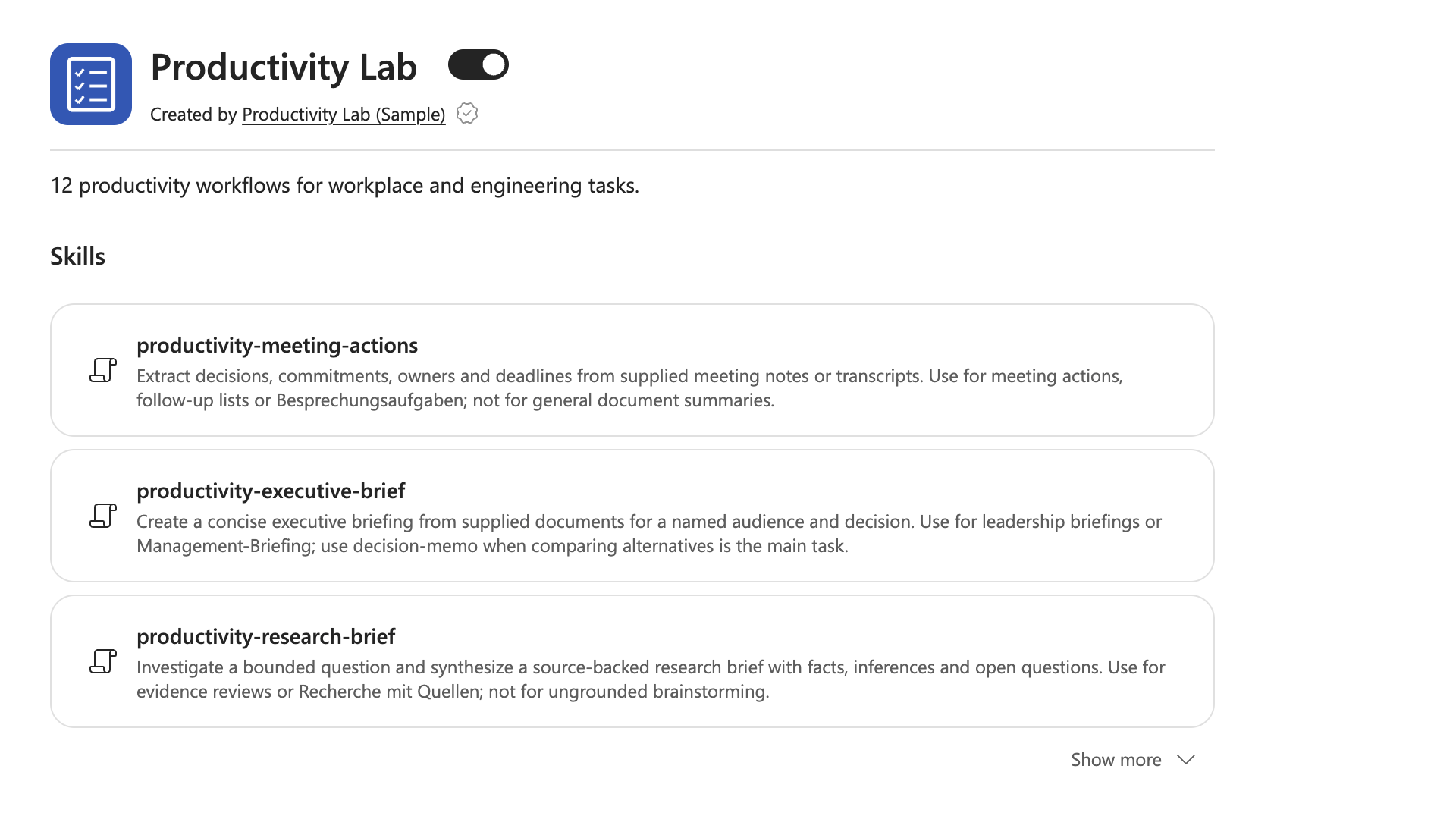
Productivity Lab’s skills are visible in Copilot Cowork. Three entries are shown; the list can be expanded.
The package contained only skills. This made the pilot a useful test of distributing reusable working methods without first building a connector or an agent.
Build a small skills plugin#
The current CLI requires Node.js 24.15 or later. Microsoft provides bootstrap installers for Windows, macOS, and Linux; the Windows installer requires PowerShell 7. They also set up the developer integrations. Installation guide
On macOS or Linux:
curl -fsSL https://aka.ms/wiqd/install.sh | bash
On Windows, from PowerShell 7:
iex "& { $(irm 'https://aka.ms/wiqd/install.ps1') }"
If your Node environment is prepared, you can install through npm and check it:
npm install -g @microsoft/wiqd
wiqd --version
wiqd doctor
Before tenant operations, sign in from a real interactive terminal:
wiqd auth login --interactive
wiqd auth status
Your Microsoft 365 permissions and access to the target experience still apply. Authentication
Now create the marketing plugin:
wiqd plugin create --name marketing-workflows
cd marketing-workflows

wiqd plugin add skill --name "Campaign Brief"
wiqd plugin add skill --name "Brand Review"
The commands scaffold skill folders and register them in the app manifest. Write the workflow into the generated files before deploying. Plugin walkthrough
For example, edit appPackage/skills/campaign-brief/SKILL.md:
---
name: campaign-brief
description: >
  Prepare a campaign brief from supplied business inputs.
  Use when asked to draft a campaign brief or plan a launch campaign.
---

# Prepare a campaign brief

1. Identify the objective, audience, offer, channels, budget, and deadline.
2. Ask for missing inputs that materially affect the brief.
3. Use the supplied brand guidance and approved product information.
4. Draft the objective, audience, message, deliverables, schedule,
   responsibilities, and success measures.
5. Label assumptions and decisions requiring review.
6. Return the draft to the user for review before publication.
This is an illustrative starting point. Replace it with the team’s actual process.
The frontmatter tells the assistant what the skill does and when it should activate. Its name must match its folder. The body provides the procedure; references and other supported companion files can carry detail. Cowork skill authoring
Keep the instructions, references, and expected outputs reviewable. Packaging a vague process will not make it a good process.
Provision before packaging#
From the plugin project, run:
wiqd plugin validate
wiqd plugin provision
wiqd plugin package
wiqd plugin validate --mode deep
Provisioning writes the environment identity values that packaging needs. Packaging produces the ZIP, and deep validation checks that built package. Standalone plugin lifecycle
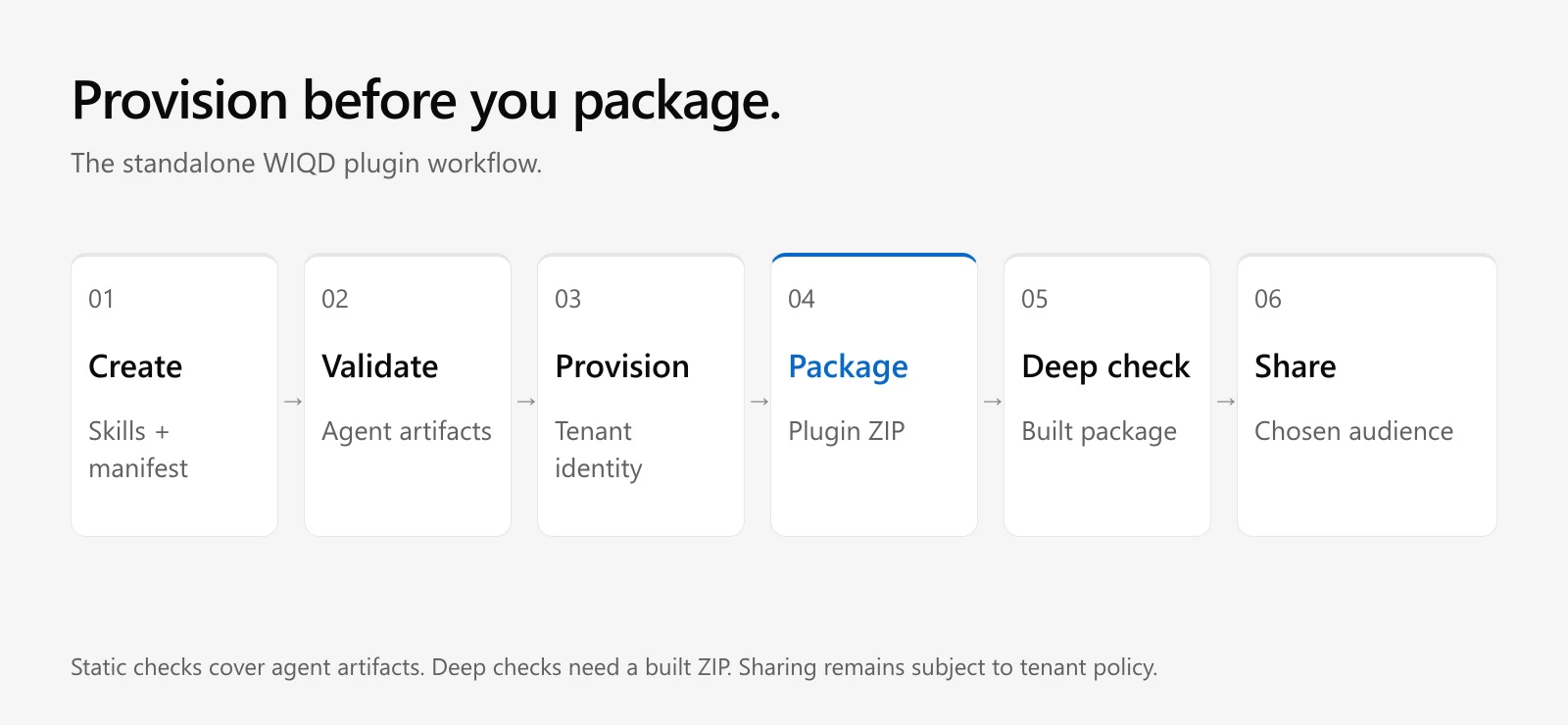
Provisioning supplies the package identity. Deep validation consumes the built ZIP.
Static validation checks declarative-agent material when present. It does not inspect standalone skill content or the top-level app manifest. A green static result for a skills-only plugin therefore covers very little. Use package-first deep validation, then test the workflow in the target experience. Skill validation guidance
In automated checks, inspect the validation result as well as the exit code. Deep validation can complete with exit code zero while data.valid is false. Validation contract
For a pilot audience:
wiqd plugin share --scope users --email pilot@contoso.com
Replace the address with the intended recipient. Tenant-wide scope is also available:
wiqd plugin share --scope tenant
Microsoft’s current guidance says this publishes the plugin to the registry for the selected audience. In Cowork, organization-wide sharing requires administrator approval. Users still need any required sign-in, consent, and connections. Distribution methods
The current standalone tree uses provision, package, and share. It has no wiqd plugin publish command; wiqd agent publish belongs to the declarative-agent catalog workflow. Command reference
Add an MCP connection when the process needs tools#
A skill can describe how to review a campaign. An MCP connection can provide the live campaign records or approved content needed for that review.
The following illustrative command assumes an existing server, registered OAuth credentials, and a tool-description file at appPackage/marketing-tools.json:
wiqd plugin add connector \
  --name "Marketing Tools" \
  --description "Approved content and campaign operations" \
  --url https://tools.contoso.com/mcp \
  --tool-description marketing-tools.json \
  --auth-type oauth \
  --auth-reference-id YOUR_VAULT_REFERENCE_ID
The URL and vault reference are placeholders. The command writes connector metadata; you still operate the server and configure its permissions.
Include the tool-description file for Cowork. The current WIQD authoring reference warns that a URL-only connector may pass authoring checks but fail verification in the product. OAuth credentials are referenced through the vault, and Cowork currently lacks API-key connector authentication. Connector authoring reference
Remote servers use HTTPS and Streamable HTTP, with MCP tool discovery and execution. After changing the plugin, rebuild and validate it, then verify the actual connection in the host. Cowork development requirements
An administrator-installed plugin can still require the user to sign in to the external service. Installation does not complete that sign-in on their behalf. Plugin connections
Govern who can use the package#
Administrators can upload a package through Microsoft 365 admin center under Agents > Tools > Registry. Review its components and audience. Existing plugins can be installed and their user scope checked under Agents > Tools > Plugins. Administrator distribution
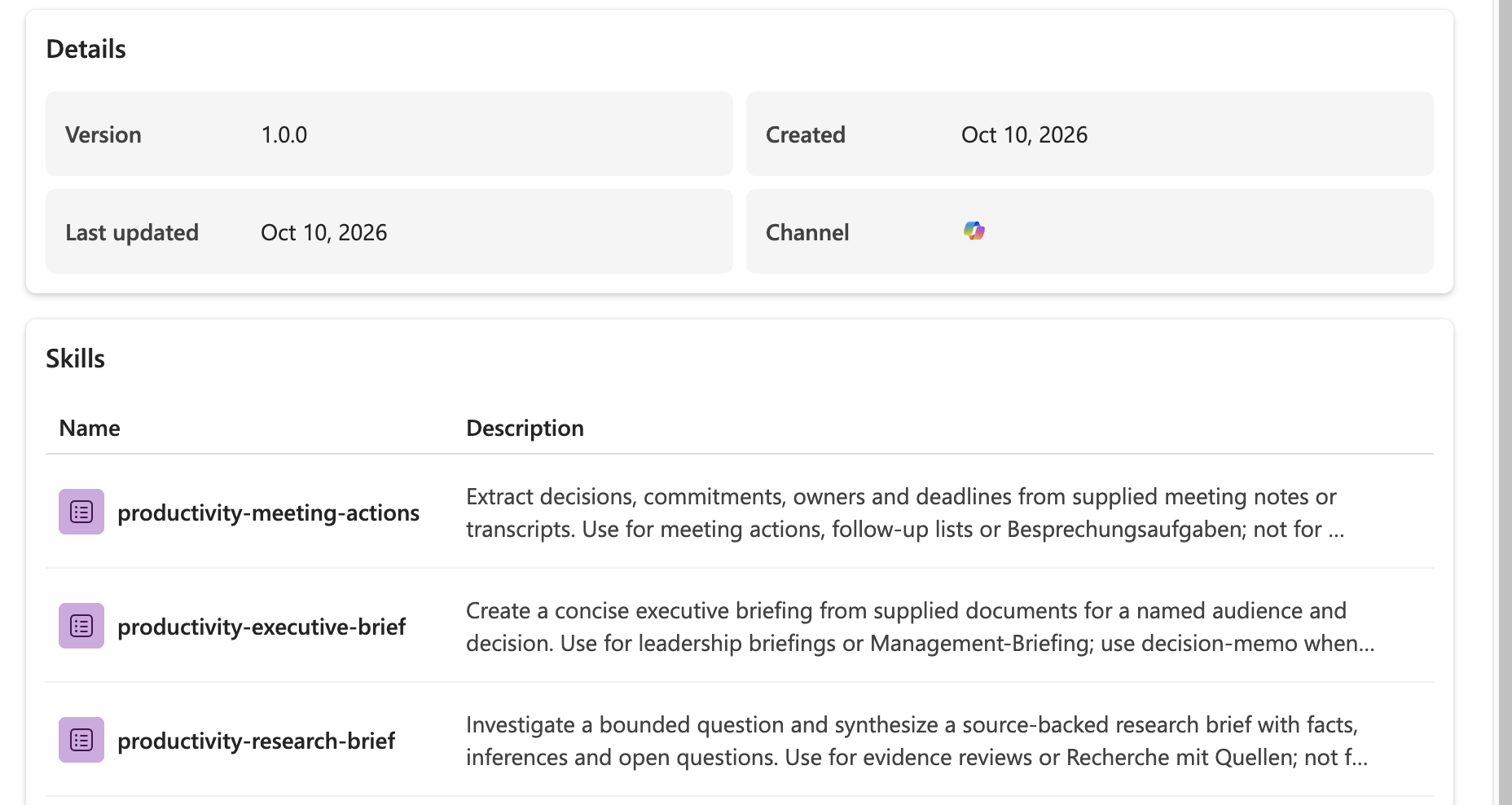
The admin overview shows package version 1.0.0 and three visible skill entries.
Availability determines who may use the plugin. Administrator installation determines who receives it without acquiring it themselves. Publisher policy determines which publisher categories the organization allows. Access requests give administrators a way to review demand for restricted plugins.
For Marketing Workflows, I would assign availability and installation to a marketing group, then use a separate group for Sites Workflows. Restricted plugins may remain discoverable with a blocked status and an access-request option. These controls should be described as governing use. Plugin availability controls
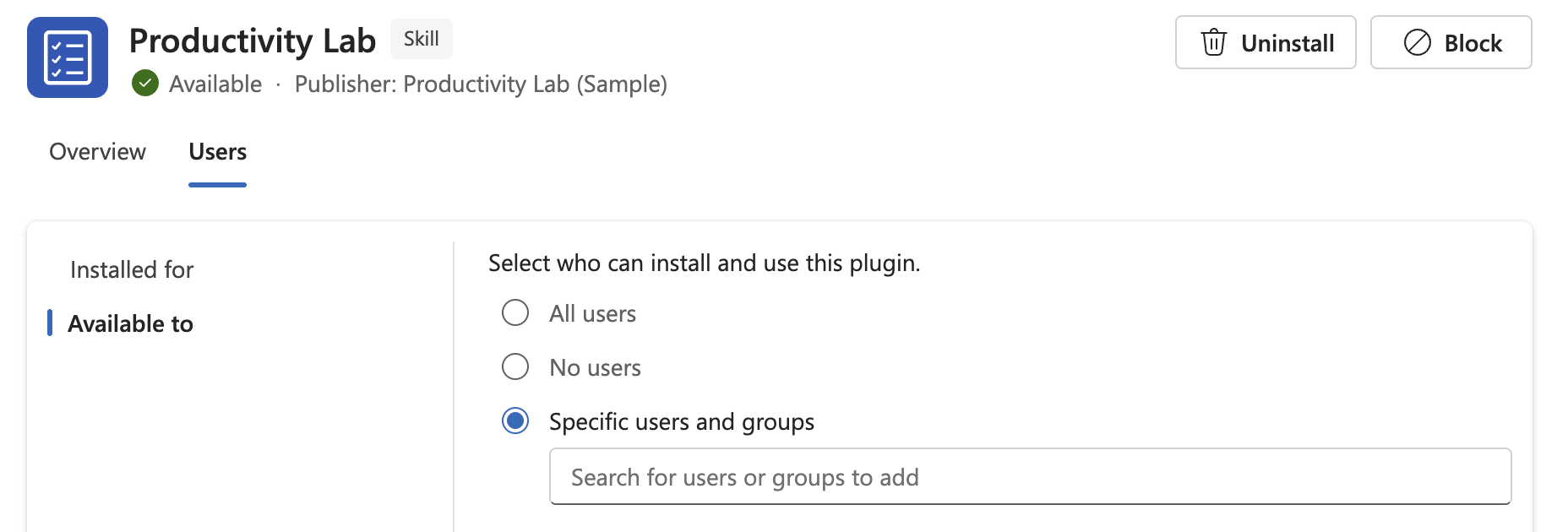
The Available to view selects Specific users and groups. Installed for is a separate view.
Blocking or uninstalling a package does not necessarily revoke consent or stop its remote service. In Cowork, blocking applies to new conversations; existing conversations can continue until they end. Verify the result with an allowed user and a user outside the intended scope. Access and connection governance
Cowork access itself also depends on a spending policy that selects the service and enables usage-based billing. Plugin installation is a separate configuration. Cowork administration
Where Agent 365 fits#
The Microsoft 365 Tools page provides inventory and request views across plugins, skills, MCP servers, and connectors. That is the wider administration context for these packages. Tools overview
Agent 365 also has a separate BYO MCP registration flow. A developer registers a server through the a365 CLI, an administrator reviews it and grants consent, and supported clients use the Agent 365 Tooling Gateway.
That path is currently preview. Its documented clients include Copilot Studio, Visual Studio Code, Claude Code, and GitHub Copilot CLI. Microsoft 365 declarative agents and Azure AI Foundry are explicitly outside that preview’s supported clients. WIQD plugin connector authoring and a365 gateway registration are distinct operations. Agent 365 BYO MCP
Advanced controls and observability have licensing requirements. Check the relevant entitlements when planning the rollout. Agent 365 service description
For public distribution, prepare the package and follow Partner Center submission and certification. Direct tenant sharing does not create a Marketplace offer. Plugin distribution overview
Skill Factory puts WIQD behind a business interface#
Our Skill Factory project uses the CLI as a packaging engine behind an application.
The implemented MVP includes a Markdown editor, version history, restore and diff views, and a picker that selects specific skill versions for a plugin. A business user can maintain the instructions and request a ZIP export without operating the terminal.
We verified the hosted flow through the browser, API, database, queue, Azure packaging worker, and retained artifact download. The worker ran WIQD; the downloaded ZIP’s checksum matched its report and preserved the authored Markdown.
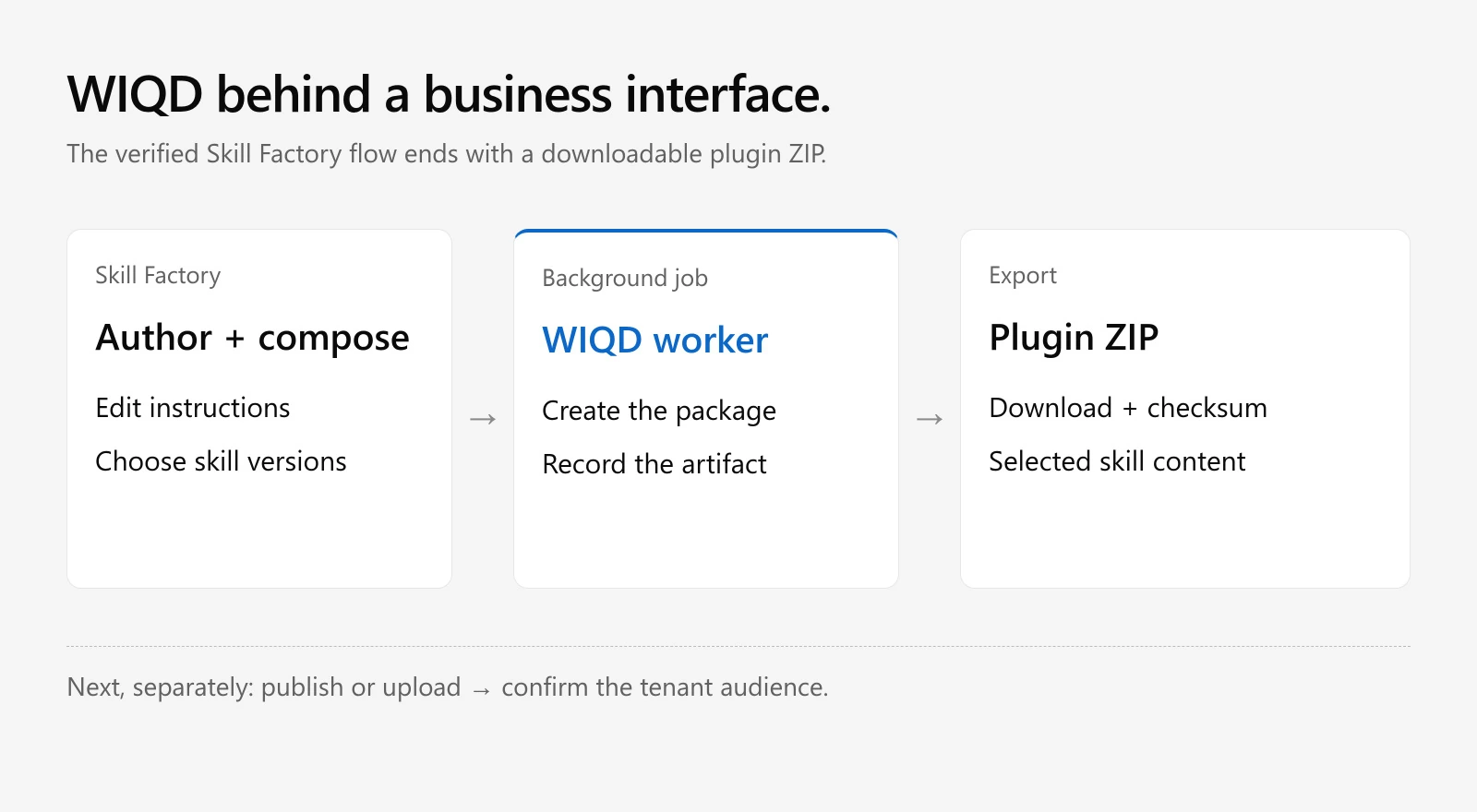
The verified application flow ends at ZIP export. Tenant publication and audience assignment are subsequent operations.
That gives us a useful separation of responsibilities. Skill Factory supplies the authoring and version-selection experience. WIQD creates the package. The deployment path and tenant controls establish its audience.
The verified Factory flow ends with a downloadable ZIP. Publishing that export into Microsoft 365 remains a separate step. Deploying the web application into Azure does not itself install its plugins for Copilot users.
This is an interesting pattern for process owners. A procurement specialist could maintain supplier-onboarding instructions while the application handles version selection and packaging. The next deployment should still identify exactly which skill versions it contains and who is allowed to use them.
The CLI also supports the wider development loop#
WIQD supplies a developer plugin for GitHub Copilot CLI. With that integration installed, you can describe an authoring task:
copilot -i "Create a marketing plugin with campaign brief and brand review skills" --agent wiqd:wiqd
The orchestrator routes the request through the relevant workflows and reports its commands. This developer plugin helps you build the departmental plugin that employees will use. Guided development
There are several other capabilities worth trying.
For declarative agents, WIQD supports scaffolding, actions, provisioning, sharing, and catalog publication. Named environments separate deployment configurations such as development and staging. Agent lifecycle, Environments
The VS Code integration adds live manifest diagnostics. It shortens the authoring feedback loop before you touch the tenant. Editor integration
Agent evaluations use a JSON prompt suite against a deployed declarative agent. You can initialize the starter and set a quality threshold:
wiqd agent eval init
wiqd agent eval --threshold 0.85 --json
Adapt the suite to your scenario. This does not automatically evaluate every standalone skills-only plugin. Eval extension
The opt-in DevUI provides browser-based testing with streaming responses, citations, retrieval detail, and plugin selection. DevUI capabilities
wiqd config flags set devui true
wiqd devui start
Work IQ integration also lists deployed agents, sends test prompts, and queries the Insights Agent about usage and health. Work IQ integration
Import and export can carry supported content between WIQD and Open Plugin, Claude, or Cursor formats. Current imported projects use a dev deployment environment; inspect it and use the matching environment for subsequent commands. Import workflow
JSON output and extensions support repeatable automation. Follow the dedicated CI authentication guidance and its release caveats before designing unattended tenant publication. CLI reference, CI authentication
Test the host and start with one team#
A portable skill format does not guarantee identical tools, authentication, or execution across every Copilot experience. Test where your users will work.
Cowork supports plugins with skills and connectors. Copilot Studio’s documented skill-file and ZIP support applies specifically to agents or workflows powered by the GitHub Copilot harness. Preserve that distinction when choosing the next destination. Cowork plugins, Studio skills
For a first departmental pilot, I would choose one recurring process, package a focused skill, and ask its owner to assess representative results. Check missing inputs and failure cases as well as the happy path. Confirm access for the intended audience before expanding distribution.
Our two projects show why WIQD deserves a closer look. It can serve a developer directly, and it can provide packaging behind a business application. The useful next step is to give a real team’s process an owner, a version, and a tested delivery path.
Start with the WIQD getting-started guide and one workflow your team already knows how to judge.
I help organizations harness the power of generative AI, with a focus on Microsoft AI and agent frameworks.
Stay in the loop
Continue with your email for subscriber access and future article updates.
Related Articles
The Road to Autopilots Is a Stack, Not a Ladder
A four-layer architecture model that separates chat, API agents, harness runtimes, and Microsoft Autopilots by who owns each responsibility.
Read moreRunning local models inside Microsoft's agent sandboxes
A small ONNX model ran locally in two Microsoft agent runtimes. The ceiling on what you can put there is packaging, not compute.
Read moreFour agent runtimes, measured from the inside
Claude Cowork, Microsoft 365 Copilot Cowork, the GitHub Copilot harness, and Codex run tasks on very different machines. Here is what each runtime actually provides.
Read moreStay in the loop
Continue with your email for subscriber access and future article updates.